
Touch Screen Display Rental
-
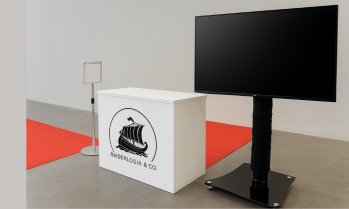
55 Inch TV Monitor Rental
-
Large 55” Full HD / 4K display for professional visuals
-
Crisp image quality with wide viewing angles
-
HDMI, USB, and VGA connectivity options
-
Slim and modern design for easy placement
-
Adjustable stands and wall mounting options available
-
Suitable for both indoor and outdoor event use (with enclosure)
-
-
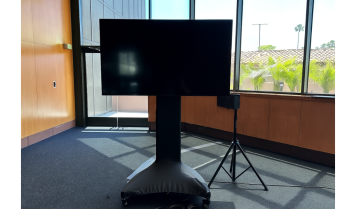
65 Inch TV Monitor Rental
-
65” Full HD / 4K UHD display for clear and detailed visuals
-
Wide viewing angles for larger audiences
-
Multiple connectivity options: HDMI, USB, VGA, DisplayPort
-
Slim, professional design for any event setting
-
Adjustable floor stands or wall mounting options available
-
Ideal for indoor events and controlled outdoor environments
-
-
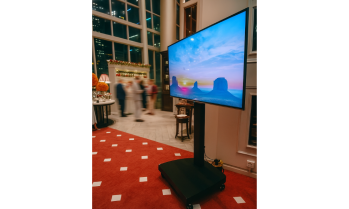
86 Inch TV Monitor Rental
-
86” Full HD / 4K UHD display for maximum visibility
-
Wide viewing angles for large audiences
-
Multiple connectivity options: HDMI, USB, VGA, DisplayPort
-
Sleek, modern design with slim bezels for a professional appearance
-
Adjustable floor stands, wall mounts, or truss mounting options
-
Suitable for indoor venues and controlled outdoor environments
-
-
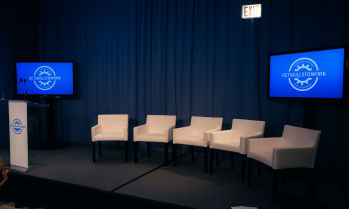
98 Inch TV Monitor Rental
-
98” Full HD / 4K UHD display for maximum audience visibility
-
Wide viewing angles for large venues
-
Multiple connectivity options: HDMI, USB, VGA, DisplayPort
-
Modern slim bezel design for a professional look
-
Adjustable floor stands, wall mounts, or truss mounting options
-
Suitable for indoor events and controlled outdoor environments
-
-
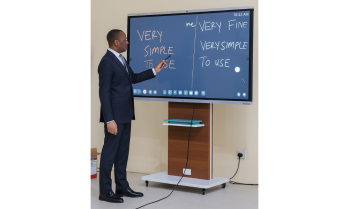
Touch Screen Smart Monitor Board Rental
-
Interactive touch screen technology with multi-touch capability
-
Available in various sizes from 55” to 98”
-
Full HD / 4K UHD resolution for sharp visuals
-
Compatible with laptops, tablets, and other devices
-
Supports annotation, drawing, and collaborative features
-
Built-in speakers with optional external audio integration
-
Can be wall-mounted or floor-standing for flexible use
-
Supports wireless screen sharing and cloud integration
-
Touch Screen Display Rental Services in Washington DC
Video Walls DC provides professional touch screen display rental services in Washington DC for conferences, trade shows, corporate meetings, exhibitions, product demonstrations, training sessions, interactive presentations, brand activations, and digital experiences.
Our current category inventory includes 55-inch, 65-inch, 86-inch, and 98-inch monitor options, along with a Touch Screen Smart Monitor Board. We configure each system around the interaction requirement, display size, application or content, viewing distance, number of users, mounting or stand requirements, source device, connectivity, event layout, and venue requirements.
A touch display should be selected for more than screen size. The right solution depends on what attendees need to do with the screen—from navigating presentations and exploring product information to collaborative meetings and interactive demonstrations.
Request a Touch Screen Display Rental Quote
Our Touch Screen Display Rental Systems
55-Inch TV Monitor Rental
Our 55 Inch TV Monitor Rental provides a compact large-format display option for event environments where viewers are relatively close to the screen.
Key Features
- 55-inch display size
- Compact footprint compared with larger 65″–98″ options
- Presentation and digital-content applications
- Event-display configuration
- Suitable for smaller exhibit and meeting environments
- Source-device integration based on the selected setup
What It Solves
Large interactive displays can overwhelm small booths, breakout rooms, or presentation areas. A 55-inch monitor provides a more practical display footprint where space and shorter viewing distances are priorities.
Best For
Trade show booths, breakout rooms, corporate meetings, product presentations, digital signage, smaller demonstrations, and event information displays.
Important: The supplied product title identifies this unit as a 55 Inch TV Monitor Rental, rather than explicitly as a touch-screen model. Touch functionality should therefore be confirmed for the exact 55-inch display before representing it as interactive.
65-Inch Touch Screen TV Monitor Rental
Our 65 Inch TV Monitor Rental provides a larger display format for interactive presentations, demonstrations, and collaborative event applications.
Key Features
- 65-inch screen size
- Product URL specifically identifies a touch-screen TV
- Large interactive display format
- Presentation applications
- Product-demonstration applications
- Event and exhibit integration
- Compatible source and software integration subject to configuration
What It Solves
When a 55-inch display does not provide enough visual area but an ultra-large monitor is unnecessary, a 65-inch screen can provide a practical balance between interaction area, visibility, and physical footprint.
Best For
Conferences, trade shows, corporate meetings, interactive presentations, product demonstrations, training sessions, exhibits, and brand activations.
86-Inch Touch Screen TV Monitor Rental
Our 86 Inch TV Monitor Rental provides a substantially larger interactive display for presentations and demonstrations that need greater visibility.
Key Features
- 86-inch screen size
- Product URL identifies touch-screen functionality
- Large interactive canvas
- Presentation and collaboration applications
- Product and software demonstrations
- Suitable for larger rooms and exhibit environments
- Source integration based on the production workflow
What It Solves
Smaller touch screens can become difficult for groups to follow when several attendees need to view the same demonstration. An 86-inch display provides a larger visual canvas while retaining direct screen interaction where supported.
Best For
Large conference rooms, training programs, exhibitions, technology demonstrations, corporate presentations, educational sessions, product launches, and interactive exhibits.
98-Inch Touch Screen TV Monitor Rental
Our 98 Inch TV Monitor Rental is the largest monitor represented in the current category inventory.
Key Features
- 98-inch screen size
- Product URL identifies touch-screen functionality
- Ultra-large monitor format
- Large presentation surface
- Interactive demonstration applications
- Suitable where increased visibility is required
- Event and exhibition deployment
What It Solves
Large meeting rooms, exhibition spaces, and group demonstrations can require more screen area than conventional monitors provide. A 98-inch display offers a large single-screen presentation surface without requiring a modular LED wall.
Best For
Corporate presentations, conferences, large demonstrations, trade shows, training sessions, technology events, interactive exhibits, and product launches.
Touch Screen Smart Monitor Board Rental
Our Touch Screen Smart Monitor Board Rental provides an interactive board-style solution for applications centered on presenting, explaining, navigating, and collaborating directly on the display.
Key Features
- Touch-screen smart-board format
- Interactive presentation applications
- Collaborative meeting use
- Training and educational applications
- Product and software demonstrations
- Direct screen interaction
- Source and application integration based on configuration
What It Solves
Traditional presentation displays are primarily designed for viewing. A smart touch-board format adds an interaction layer that can make it easier to navigate material, demonstrate workflows, present information, and collaborate directly at the screen.
Best For
Corporate meetings, workshops, training sessions, education events, breakout sessions, interactive presentations, technology demonstrations, and collaborative environments.
Touch Screen Display Selection Guide
| Requirement | Display We May Consider | Best For |
|---|---|---|
| Compact event display | 55″ Monitor* | Booths, meetings, presentations |
| Mid-size interactive display | 65″ Touch Screen | Conferences, demos, exhibits |
| Large interactive canvas | 86″ Touch Screen | Training, presentations, technology events |
| Maximum listed single-screen size | 98″ Touch Screen | Large rooms, exhibits, group demonstrations |
| Collaborative interaction | Touch Screen Smart Monitor Board | Workshops, meetings, training |
*Touch functionality should be confirmed for the specific 55-inch unit.
The largest screen is not automatically the best choice. We consider viewing distance, interaction distance, room dimensions, content, attendee flow, and application before recommending a display.
How We Configure Touch Screen Displays for Washington DC Events
Screen Size & Interaction Distance
Touch screens are viewed differently from conventional event displays because the person interacting with the screen must usually stand directly in front of it.
We evaluate both the operator’s interaction distance and the audience’s viewing distance when selecting between 55″, 65″, 86″, and 98″ displays.
Touch Functionality
Not every monitor should automatically be assumed to provide identical touch capabilities.
Touch technology, number of simultaneous touch points, supported gestures, response characteristics, operating-system compatibility, and connection requirements should be confirmed for the exact display model.
Resolution
We do not describe every screen as Full HD or 4K without model-specific verification.
Display resolution affects:
- Text clarity
- Interface detail
- Spreadsheet readability
- Software demonstrations
- Image detail
- Video playback
- Touch-interface design
The source computer should also be configured to output an appropriate resolution for the selected display.
Computer & Software Integration
A touch display typically requires more than a video signal when interactive functionality is needed.
The complete workflow can involve:
- Computer or media source
- Video connection
- Touch-data connection
- Operating system
- Drivers where required
- Application or website
- Network connectivity where required
- Correct display scaling
- Touch calibration where applicable
We test the complete interaction workflow rather than treating the monitor as a standalone solution.
Application Compatibility
A touch screen does not automatically make a website, presentation, application, or software platform suitable for event interaction.
The application should be tested for:
- Touch navigation
- Button size
- Screen orientation
- Display resolution
- Browser compatibility
- Full-screen operation
- Keyboard requirements
- User flow
- Session reset requirements
- Network dependence
Portrait or Landscape Orientation
Orientation depends on the specific monitor, mounting solution, application design, and manufacturer guidance.
Landscape is common for presentations and collaboration, while portrait can be useful for certain digital-signage and interactive applications when the selected hardware supports it.
Mounting & Stands
Touch displays require stable support because users physically interact with the screen.
Available mounting or stand configurations should therefore be matched to the display size, weight, interaction requirements, venue environment, attendee flow, and equipment specifications.
Connectivity
We do not assume that every display provides the same HDMI, DisplayPort, USB, USB-C, wireless, or network connections.
The required signal and touch connections are confirmed for the selected monitor and source equipment.
Touch Screen Display Applications in Washington DC
Trade Shows & Exhibitions
Touch displays allow attendees to explore product information, presentations, digital catalogs, demonstrations, maps, videos, and interactive experiences within exhibit environments.
Corporate Meetings
Interactive displays can support presentations, collaborative sessions, workshops, planning meetings, and visual discussions.
Conferences
Touch screens work well in breakout rooms, demonstration areas, sponsor exhibits, technology showcases, and interactive information stations.
Product Demonstrations
Presenters can navigate product information, software interfaces, digital prototypes, presentations, and other compatible interactive material directly from the display.
Technology Demonstrations
Large touch screens provide a practical interface for demonstrating software platforms, applications, dashboards, digital products, and interactive workflows.
Training Sessions
Instructors can use interactive displays to navigate course materials, demonstrate processes, and work through visual information with attendees.
Education Events
Touch displays can support lectures, workshops, university programs, educational demonstrations, and collaborative sessions.
Brand Activations
Interactive screens can turn static digital content into an attendee-driven experience where users explore products, information, media, or branded applications.
Interactive Wayfinding
Where suitable software is provided, touch displays can support searchable maps, schedules, directories, and event information.
Registration & Check-In
Potentially. Touch displays can act as an interface for compatible registration or check-in software.
The display itself does not provide the registration platform, database, badge printer, scanner, or attendee-management system unless those components are separately integrated.
What’s Included With Our Touch Screen Display Rental?
| Service | What We Provide |
|---|---|
| Application Review | Review of the intended interactive use |
| Display Selection | Appropriate monitor size and configuration |
| Placement Planning | Positioning around users and attendee flow |
| Source Planning | Computer, playback, or application workflow |
| Touch Integration | Touch-data connection where required |
| Connectivity Planning | Required signal and network workflow |
| Stand/Mount Planning | Compatible support configuration |
| Content Coordination | Presentation, website, software, or media review |
| Delivery | Equipment transportation |
| Professional Setup | Display and supporting-system installation |
| System Configuration | Source and interaction setup |
| Application Testing | Interactive workflow verification |
| Technical Support | Support according to agreed scope |
| Strike & Removal | Post-event equipment removal |
Exact equipment included depends on the selected monitor and rental package.
How We Deliver Your Touch Screen Display Rental
1. Event & Application Review
We review the event, room, audience, application, content, interaction requirements, screen location, source equipment, and technical workflow.
2. Display Selection
We select the appropriate screen size and interactive configuration based on the actual application.
3. Content & Software Review
We identify the website, presentation, application, video, software, or other material attendees will interact with.
4. Venue & Placement Coordination
Display location, stand requirements, power, cabling, attendee flow, and venue requirements are established.
5. Delivery & Professional Installation
The monitor, stand, source equipment, and supporting components included in the rental are installed.
6. System & Touch Configuration
Video output, touch communication, display settings, source computer, and application are configured as required.
7. Interaction Testing
We test the complete user workflow before the event rather than verifying only that an image appears on the screen.
8. Technical Support & Removal
Where included, technical support is provided during the program. Afterward, the equipment is removed according to the event schedule.
Washington DC Venues We Serve
- Walter E. Washington Convention Center — Trade shows, conventions, exhibits, and conferences.
- Ronald Reagan Building and International Trade Center — Corporate, association, international, and government-related events.
- Marriott Marquis Washington DC — Conferences, meetings, exhibits, and corporate programs.
- Washington Hilton — Conferences, association meetings, corporate programs, and special events.
- Gaylord National Resort & Convention Center — Conventions, exhibitions, corporate events, and conferences.
- National Building Museum — Galas, corporate events, exhibits, and special programs.
- The Wharf DC — Hospitality, corporate, experiential, and entertainment events.
- Union Station Washington DC — Special events, activations, exhibitions, and public-facing programs.
Equipment placement and installation remain subject to the venue’s access, electrical, mounting, safety, security, and production requirements.
Industries & Organizations We Work With
- Corporate — Meetings, presentations, training, and product demonstrations.
- Technology — Software demos, interactive products, dashboards, and launches.
- Government — Approved meetings, conferences, presentations, and programs.
- Healthcare — Medical conferences, education, presentations, and exhibits.
- Associations — Conferences, annual meetings, exhibits, and workshops.
- Education — Training, university events, workshops, and demonstrations.
- Financial Services — Meetings, conferences, presentations, and interactive data.
- Nonprofits — Conferences, fundraising events, education, and public programs.
- Hospitality — Guest information, meetings, conferences, and events.
- Trade Shows — Booth interaction, demonstrations, catalogs, and lead-generation experiences.
- Experiential Agencies — Interactive activations and branded experiences.
- Event Producers — Temporary interactive display systems.
Touch Screen Display Rental Areas We Serve
- Downtown Washington DC — Conferences, trade shows, meetings, and corporate events.
- Capitol Hill — Government, association, policy, and professional programs.
- Georgetown — University, hospitality, corporate, and special events.
- Dupont Circle — Association, nonprofit, corporate, and professional events.
- The Wharf — Hospitality, experiential, corporate, and entertainment events.
- Penn Quarter — Convention, corporate, entertainment, and exhibition applications.
- Foggy Bottom — University, institutional, healthcare, and corporate programs.
- Arlington — Corporate meetings, conferences, exhibits, and technology events.
- Alexandria — Corporate, association, hospitality, and conference programs.
- Bethesda — Healthcare, corporate, education, and professional events.
Why Choose Video Walls DC for Touch Screen Display Rental?
- 55″–98″ listed monitor options
- 65″, 86″ and 98″ touch-screen product options
- Touch Screen Smart Monitor Board
- Application-specific display selection
- Interactive workflow planning
- Source-device integration
- Software and content testing
- Touch-system configuration
- Display scaling and resolution planning
- Stable stand and placement planning
- Multi-display deployment capability
- Event-network coordination where required
- Professional delivery
- Professional installation
- Pre-event interaction testing
- Technical support
- Washington DC event-production experience
- Complete removal after the event
Frequently Asked Questions About Touch Screen Display Rental in Washington DC
What touch screen display sizes do you offer?
Our current category inventory includes 55-inch, 65-inch, 86-inch, and 98-inch monitor options, plus a Touch Screen Smart Monitor Board.
The 65″, 86″, and 98″ product URLs explicitly identify touch-screen functionality. Touch capability for the specific 55″ unit should be confirmed.
What is your largest touch screen display?
The 98-inch Touch Screen TV Monitor is the largest touch-screen size explicitly represented in the supplied category inventory.
Which touch screen size should I rent?
The best size depends on how many people need to view it, how close the primary user stands, room dimensions, content, application design, and available installation space.
Is a 98-inch screen always better than a 65-inch screen?
No. A 98-inch display provides greater visual area, but a smaller screen may provide a more comfortable interaction experience in a compact booth or meeting room.
Are all your monitors touch screens?
Do not assume so. This category includes monitor products, and touch capability should be verified for each specific model.
Are your touch screens 4K?
Resolution should be confirmed for the exact monitor model. We do not describe every display as 4K without model-specific verification.
Do your touch screens support multi-touch?
Potentially, depending on the exact model and touch technology. The supported number of simultaneous touch points should be confirmed before the event.
Can multiple people use the screen simultaneously?
Potentially. This depends on the display’s verified multi-touch capability and the application being used.
Can I connect my laptop?
Usually, with an appropriate compatible video and touch-data connection. We confirm the required connections for the selected display and computer.
Does touch work through HDMI alone?
Typically, video and touch communication are separate functions. The exact connection workflow depends on the monitor and source device.
Can I connect a Mac?
Potentially. Compatibility depends on the display, connection method, operating system, adapters, touch drivers where required, and application.
Can I use a Windows computer?
Potentially. The exact setup depends on the selected monitor and required interactive workflow.
Can I display a PowerPoint presentation?
Yes. Touch displays can show PowerPoint through a compatible computer and video connection.
Interactive control depends on how the computer and touch interface are configured.
Can I use a website on the touch screen?
Yes, potentially. The website should be tested for touch navigation, browser compatibility, screen resolution, internet requirements, and interface design.
Can I run a custom application?
Potentially. We recommend testing the exact application, operating system, hardware, resolution, touch input, connectivity, and user workflow before the event.
Can I demonstrate software on the screen?
Yes. Software demonstrations are a strong use case for large interactive displays when the required computer and touch workflow are properly configured.
Can I display an interactive map?
Yes, with compatible map or wayfinding software.
Can the screen be used for event wayfinding?
Yes. A properly configured interactive application can provide maps, directories, schedules, room information, and other event navigation.
Can I use a touch screen for event registration?
Potentially. The monitor can provide the interactive interface, but registration also requires compatible software and potentially internet connectivity, databases, scanners, printers, or other peripherals.
Does the screen include registration software?
Not automatically. Registration software should be provided or scoped separately.
Can it print attendee badges?
Not by itself. Badge printing requires compatible registration software, printer hardware, drivers, media, and system integration.
Can I connect a barcode or QR scanner?
Potentially. Scanner compatibility depends on the computer, application, connection method, and workflow.
Can touch screens capture leads at a trade show?
Yes, when integrated with an appropriate form, application, CRM, or lead-capture platform.
The monitor itself does not automatically store or process leads.
Can attendees fill out forms?
Yes, with a compatible website or application.
If extensive text entry is required, an appropriate on-screen or physical keyboard workflow should be considered.
Can attendees sign documents on the screen?
Potentially, if the selected display and software support the required signature workflow.
Legal or compliance requirements for electronic signatures depend on the application and intended use.
Can I use the display as a digital whiteboard?
Potentially. The Touch Screen Smart Monitor Board is particularly relevant to collaborative and whiteboard-style applications, subject to its software capabilities.
Can presenters annotate content?
Potentially, depending on the display and presentation or annotation software being used.
Can I save annotations?
That depends primarily on the software and source computer rather than the touch screen alone.
Can the touch screen show video?
Yes. Compatible video content can be displayed through the source system.
Can I use it for video conferencing?
Potentially. Video conferencing also requires the appropriate computer, platform, camera, microphones, speakers, connectivity, and room setup.
Does the rental include a computer?
A computer should not be assumed to be included with every monitor rental. The required source device should be confirmed in the rental scope.
Does the rental include a stand?
Stand or mounting requirements should be confirmed for the selected display and rental package.
Can the monitor be wall mounted?
Potentially, where the specific display, mount, wall structure, venue, and installation conditions support it.
Temporary event installations commonly use appropriate floor stands where wall mounting is impractical.
Can the screen be used vertically?
Potentially, depending on the monitor model, mounting solution, manufacturer guidance, application, and content orientation.
Can you provide several touch screens for one event?
Yes, subject to inventory availability and project requirements.
Multiple displays can support exhibits, demonstrations, registration stations, breakout rooms, and interactive experiences.
Can every screen show different content?
Potentially. Each display can be configured with its own source or content workflow where required.
Can multiple screens show the same content?
Yes. Signal distribution can potentially send common content to multiple displays.
Do touch screens require internet?
Not inherently.
Locally stored presentations, videos, and applications can operate without internet. Websites, cloud applications, remote databases, registration platforms, and live online content may require connectivity.
Can we use venue Wi-Fi?
Potentially, but mission-critical interactive applications should not assume that shared venue Wi-Fi will provide sufficient bandwidth, stability, security, or network access.
Connectivity requirements should be evaluated before the event.
Can the screen work offline?
Yes, if the application and content are designed for offline operation.
Can you test our application before the event?
Yes. Pre-event testing is strongly recommended for interactive applications.
What should be tested?
We recommend testing resolution, touch response, navigation, buttons, forms, browser behavior, keyboard workflow, media playback, network dependence, session reset, and the complete attendee journey.
How large should buttons be on an event touch-screen interface?
There is no universal size for every application. Controls should be designed for comfortable finger interaction at the display’s intended resolution and physical size.
Should I design the interface differently for a touch screen?
Usually, yes. Touch interfaces benefit from clear navigation, larger interaction targets, limited text entry, strong visual hierarchy, obvious controls, and simple user flows.
How do I stop one attendee’s information from appearing for the next user?
The application should include an appropriate session reset, logout, timeout, or return-to-home workflow. This is primarily an application-design requirement rather than a monitor feature.
Can touch screens be used for government events?
Potentially. Technical access, staffing, equipment procedures, connectivity, credentialing, and operational requirements depend on the event organizer, venue, and applicable security protocols.
Can a rental touch screen display classified information?
Our standard rental display systems should not be assumed approved for classified information. Any classified or specially controlled content requires the organizer to establish the appropriate secure environment, approved equipment, procedures, and technical requirements before production planning.
Are touch screens suitable for medical conferences?
Yes. They can support presentations, product demonstrations, educational content, interactive exhibits, and approved software applications.
Any system handling protected or regulated information requires the organizer to establish the appropriate technology, privacy, security, and compliance environment.
How long does touch-screen setup take?
Setup time depends on display quantity, screen size, stands, source computers, applications, networking, cabling, touch configuration, calibration, testing, and venue access.
How much does touch screen display rental cost in Washington DC?
Pricing depends on display size, quantity, model, rental duration, stands or mounting, computers, software requirements, delivery, labor, networking, technical support, and overall production scope.
How far in advance should I reserve touch screens?
Early booking is recommended for large quantities, 86″ or 98″ displays, major conventions, trade shows, custom interactive applications, and high-demand event dates.
What information do you need for a quote?
Send us the event date, venue, number of displays, preferred screen sizes, application or content, source computers, touch requirements, orientation, stand requirements, connectivity needs, event hours, and technical-support requirements.